Phiên
Đại lý Hermes tự động lưu mọi cuộc trò chuyện dưới dạng phiên. Phiên cho phép tiếp tục cuộc trò chuyện, tìm kiếm giữa các phiên và quản lý toàn bộ lịch sử cuộc trò chuyện.
Phiên hoạt động như thế nào
Mọi cuộc trò chuyện — cho dù từ CLI, Telegram, Discord, Slack, WhatsApp, Signal, Matrix hay bất kỳ nền tảng nhắn tin nào khác — đều được lưu trữ dưới dạng một phiên có đầy đủ lịch sử tin nhắn. Các phiên được theo dõi trong hai hệ thống bổ sung:
- Cơ sở dữ liệu SQLite (
~/.hermes/state.db) — siêu dữ liệu phiên có cấu trúc với tìm kiếm toàn văn bản FTS5 - Bản ghi JSON (
~/.hermes/sessions/) — bản ghi cuộc hội thoại thô bao gồm các lệnh gọi công cụ (cổng)
Cơ sở dữ liệu SQLite lưu trữ:
- ID phiên, nền tảng nguồn, ID người dùng
- Tiêu đề phiên (tên duy nhất, con người có thể đọc được)
- Tên model và cấu hình
- Ảnh chụp nhanh lời nhắc của hệ thống
- Lịch sử tin nhắn đầy đủ (vai trò, nội dung, lệnh gọi công cụ, kết quả công cụ)
- Số lượng mã thông báo (đầu vào/đầu ra)
- Dấu thời gian (bắt đầu_lúc, kết thúc_lúc)
- ID phiên gốc (để phân tách phiên kích hoạt nén)
Nguồn phiên
Mỗi phiên được gắn thẻ với nền tảng nguồn của nó:
| Nguồn | Mô tả |
|---|---|
cli | CLI tương tác (hermes hoặc hermes chat) |
điện tín | Sứ giả điện tín |
bất hòa | Máy chủ bất hòa/DM |
lười biếng | Không gian làm việc lười biếng |
whatsapp | Tin nhắn WhatsApp |
tín hiệu | Người đưa tin tín hiệu |
ma trận | Phòng ma trận và DM |
quan trọng nhất | Kênh quan trọng nhất |
email | Email (IMAP/SMTP) |
tin nhắn | SMS qua Twilio |
dingtalk | Tin nhắn DingTalk |
feishu | Feishu/Người đưa tin Lark |
wecom | WeCom (WeChat Work) |
trợ lý gia đình | Trò chuyện tại nhà Trợ lý |
webhook | Webhook đến |
máy chủ api | Yêu cầu máy chủ API |
acp | Tích hợp trình soạn thảo ACP |
cron | Công việc định kỳ theo lịch trình |
đợt | Chạy xử lý hàng loạt |
Tiếp tục phiên CLI
Tiếp tục các cuộc hội thoại trước đó từ CLI bằng cách sử dụng --continue hoặc --resume:
Tiếp tục phiên cuối cùng
# Resume the most recent CLI session
hermes --continue
hermes -c

# Or with the chat subcommand
hermes chat --continue
hermes chat -c
Thao tác này sẽ tra cứu phiên cli gần đây nhất từ cơ sở dữ liệu SQLite và tải toàn bộ lịch sử hội thoại của nó.
Tiếp tục theo tên
Nếu bạn đã đặt tiêu đề cho phiên (xem Đặt tên phiên bên dưới), bạn có thể tiếp tục phiên đó theo tên:
# Resume a named session
hermes -c "my project"

# If there are lineage variants (my project, my project #2, my project #3),
# this automatically resumes the most recent one
hermes -c "my project"   # → resumes "my project #3"
Tiếp tục phiên cụ thể
# Resume a specific session by ID
hermes --resume 20250305_091523_a1b2c3d4
hermes -r 20250305_091523_a1b2c3d4

# Resume by title
hermes --resume "refactoring auth"

# Or with the chat subcommand
hermes chat --resume 20250305_091523_a1b2c3d4
ID phiên được hiển thị khi bạn thoát khỏi phiên CLI và có thể được tìm thấy trong danh sách phiên hermes.
Tóm tắt cuộc trò chuyện về sơ yếu lý lịch
Khi bạn tiếp tục phiên, Hermes hiển thị bản tóm tắt ngắn gọn về cuộc trò chuyện trước đó trong bảng điều khiển được tạo kiểu trước lời nhắc nhập:
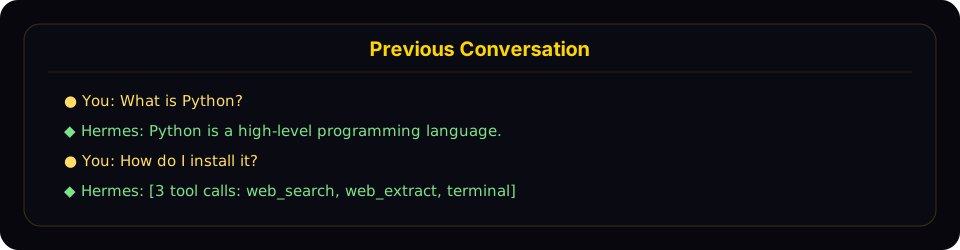
Resume mode shows a compact recap panel with recent user and assistant turns before returning you to the live prompt.
Tóm tắt:
- Hiển thị tin nhắn của người dùng (vàng
●) và phản hồi trợ lý (xanh◆) - Truncates long messages (300 chars for user, 200 chars / 3 lines for assistant)
- Collapses tool calls to a count with tool names (e.g.,
[3 tool calls: terminal, web_search]) - Hides system messages, tool results, and internal reasoning
- Caps at the last 10 exchanges with a "... N earlier messages ..." indicator
- Uses dim styling to distinguish from the active conversation
To disable the recap and keep the minimal one-liner behavior, set in ~/.hermes/config.yaml:
display:
  resume_display: minimal   # default: full
Session IDs follow the format YYYYMMDD_HHMMSS_<8-char-hex>, e.g. 20250305_091523_a1b2c3d4. You can resume by ID or by title — both work with -c and -r.
Session Naming
Give sessions human-readable titles so you can find and resume them easily.
Auto-Generated Titles
Hermes automatically generates a short descriptive title (3–7 words) for each session after the first exchange. This runs in a background thread using a fast auxiliary model, so it adds no latency. You'll see auto-generated titles when browsing sessions with hermes sessions list or hermes sessions browse.
Auto-titling only fires once per session and is skipped if you've already set a title manually.
Setting a Title Manually
Use the /title slash command inside any chat session (CLI or gateway):
/title my research project
The title is applied immediately. If the session hasn't been created in the database yet (e.g., you run /title before sending your first message), it's queued and applied once the session starts.
You can also rename existing sessions from the command line:
hermes sessions rename 20250305_091523_a1b2c3d4 "refactoring auth module"
Title Rules
- Unique — no two sessions can share the same title
- Max 100 characters — keeps listing output clean
- Sanitized — control characters, zero-width chars, and RTL overrides are stripped automatically
- Normal Unicode is fine — emoji, CJK, accented characters all work
Auto-Lineage on Compression
When a session's context is compressed (manually via /compress or automatically), Hermes creates a new continuation session. If the original had a title, the new session automatically gets a numbered title:
"my project" → "my project #2" → "my project #3"
When you resume by name (hermes -c "my project"), it automatically picks the most recent session in the lineage.
/title in Messaging Platforms
The /title command works in all gateway platforms (Telegram, Discord, Slack, WhatsApp):
/title My Research— set the session title/title— show the current title
Session Management Commands
Hermes provides a full set of session management commands via hermes sessions:
List Sessions
# List recent sessions (default: last 20)
hermes sessions list

# Filter by platform
hermes sessions list --source telegram

# Show more sessions
hermes sessions list --limit 50
When sessions have titles, the output shows titles, previews, and relative timestamps:
Title                  Preview                                  Last Active   ID
────────────────────────────────────────────────────────────────────────────────────────────────
refactoring auth       Help me refactor the auth module please   2h ago        20250305_091523_a
my project #3          Can you check the test failures?          yesterday     20250304_143022_e
—                      What's the weather in Las Vegas?          3d ago        20250303_101500_f
When no sessions have titles, a simpler format is used:
Preview                                            Last Active   Src    ID
──────────────────────────────────────────────────────────────────────────────────────
Help me refactor the auth module please             2h ago        cli    20250305_091523_a
What's the weather in Las Vegas?                    3d ago        tele   20250303_101500_f
Export Sessions
# Export all sessions to a JSONL file
hermes sessions export backup.jsonl

# Export sessions from a specific platform
hermes sessions export telegram-history.jsonl --source telegram

# Export a single session
hermes sessions export session.jsonl --session-id 20250305_091523_a1b2c3d4
Exported files contain one JSON object per line with full session metadata and all messages.
Delete a Session
# Delete a specific session (with confirmation)
hermes sessions delete 20250305_091523_a1b2c3d4

# Delete without confirmation
hermes sessions delete 20250305_091523_a1b2c3d4 --yes
Rename a Session
# Set or change a session's title
hermes sessions rename 20250305_091523_a1b2c3d4 "debugging auth flow"

# Multi-word titles don't need quotes in the CLI
hermes sessions rename 20250305_091523_a1b2c3d4 debugging auth flow
If the title is already in use by another session, an error is shown.
Prune Old Sessions
# Delete ended sessions older than 90 days (default)
hermes sessions prune

# Custom age threshold
hermes sessions prune --older-than 30

# Only prune sessions from a specific platform
hermes sessions prune --source telegram --older-than 60

# Skip confirmation
hermes sessions prune --older-than 30 --yes
Pruning only deletes ended sessions (sessions that have been explicitly ended or auto-reset). Active sessions are never pruned.
Session Statistics
hermes sessions stats
Output:
Total sessions: 142
Total messages: 3847
  cli: 89 sessions
  telegram: 38 sessions
  discord: 15 sessions
Database size: 12.4 MB
For deeper analytics — token usage, cost estimates, tool breakdown, and activity patterns — use hermes insights.
Session Search Tool
The agent has a built-in session_search tool that performs full-text search across all past conversations using SQLite's FTS5 engine.
How It Works
- FTS5 searches matching messages ranked by relevance
- Groups results by session, takes the top N unique sessions (default 3)
- Loads each session's conversation, truncates to ~100K chars centered on matches
- Sends to a fast summarization model for focused summaries
- Returns per-session summaries with metadata and surrounding context
FTS5 Query Syntax
The search supports standard FTS5 query syntax:
- Simple keywords:
docker deployment - Phrases:
"exact phrase" - Boolean:
docker OR kubernetes,python NOT java - Prefix:
deploy*
When It's Used
The agent is prompted to use session search automatically:
"When the user references something from a past conversation or you suspect relevant prior context exists, use session_search to recall it before asking them to repeat themselves."
Per-Platform Session Tracking
Gateway Sessions
On messaging platforms, sessions are keyed by a deterministic session key built from the message source:
| Chat Type | Default Key Format | Behavior |
|---|---|---|
| Telegram DM | agent:main:telegram:dm:<chat_id> | One session per DM chat |
| Discord DM | agent:main:discord:dm:<chat_id> | One session per DM chat |
| WhatsApp DM | agent:main:whatsapp:dm:<chat_id> | One session per DM chat |
| Group chat | agent:main:<platform>:group:<chat_id>:<user_id> | Per-user inside the group when the platform exposes a user ID |
| Group thread/topic | agent:main:<platform>:group:<chat_id>:<thread_id>:<user_id> | Per-user inside that thread/topic |
| Channel | agent:main:<platform>:channel:<chat_id>:<user_id> | Per-user inside the channel when the platform exposes a user ID |
When Hermes cannot get a participant identifier for a shared chat, it falls back to one shared session for that room.
Shared vs Isolated Group Sessions
By default, Hermes uses group_sessions_per_user: true in config.yaml. That means:
- Alice and Bob can both talk to Hermes in the same Discord channel without sharing transcript history
- one user's long tool-heavy task does not pollute another user's context window
- interrupt handling also stays per-user because the running-agent key matches the isolated session key
If you want one shared "room brain" instead, set:
group_sessions_per_user: false
That reverts groups/channels to a single shared session per room, which preserves shared conversational context but also shares token costs, interrupt state, and context growth.
Session Reset Policies
Gateway sessions are automatically reset based on configurable policies:
- idle — reset after N minutes of inactivity
- daily — reset at a specific hour each day
- both — reset on whichever comes first (idle or daily)
- none — never auto-reset
Before a session is auto-reset, the agent is given a turn to save any important memories or skills from the conversation.
Sessions with active background processes are never auto-reset, regardless of policy.
Storage Locations
| What | Path | Description |
|---|---|---|
| SQLite database | ~/.hermes/state.db | All session metadata + messages with FTS5 |
| Gateway transcripts | ~/.hermes/sessions/ | JSONL transcripts per session + sessions.json index |
| Gateway index | ~/.hermes/sessions/sessions.json | Maps session keys to active session IDs |
The SQLite database uses WAL mode for concurrent readers and a single writer, which suits the gateway's multi-platform architecture well.
Database Schema
Key tables in state.db:
- sessions — session metadata (id, source, user_id, model, title, timestamps, token counts). Titles have a unique index (NULL titles allowed, only non-NULL must be unique).
- messages — full message history (role, content, tool_calls, tool_name, token_count)
- messages_fts — FTS5 virtual table for full-text search across message content
Session Expiry and Cleanup
Automatic Cleanup
- Gateway sessions auto-reset based on the configured reset policy
- Before reset, the agent saves memories and skills from the expiring session
- Ended sessions remain in the database until pruned
Manual Cleanup
# Prune sessions older than 90 days
hermes sessions prune

# Delete a specific session
hermes sessions delete <session_id>

# Export before pruning (backup)
hermes sessions export backup.jsonl
hermes sessions prune --older-than 30 --yes
The database grows slowly (typical: 10-15 MB for hundreds of sessions). Pruning is mainly useful for removing old conversations you no longer need for search recall.